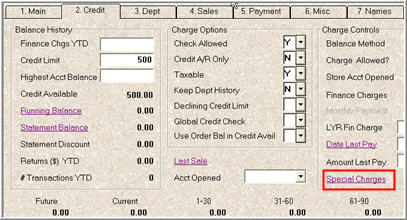
Use the following procedure to assign Special Charges to the appropriate customer accounts.
Display the Customer Maintenance Window, and click the Credit tab.
Display the customer to whom you want to assign special charges.
Click the Special Charges hyperlink.
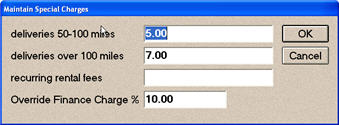
Enter a percent (a number with two decimal places) in any or all of the fields, then click OK.
The descriptions of the first three special charges come from options 8371, 8372, and 8373, which you set up earlier. In the example below, the customer will be charged 5% for any deliveries between 50-100 miles, 7% for deliveries over 100 miles, and their finance charge on past due statements will be 10%.
Click Change on the toolbar to save your changes.
To calculate these special charges, you must run the Aging Report (RAG) with Update Option S before you run statements. If you currently calculate finance charges before running statements, this process is very similar; the only difference is that standard finance charges are calculated by running RAG with Update Option X (instead of S).