Age Restricted Items in POS: Using
If you set up the options for Age
Restricted Items in POS, this topic outlines what happens when you
ring up minimum age items at POS.
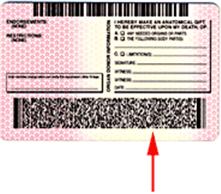
When prompted, scan
the customer's driver's license, or enter the
customer's birth date for the age restricted item. If the customer
is clearly old enough to purchase the item, enter a generic birth
date that you have established for this purpose, such as 7/7/77 (something
easy to enter and to remember).
The first time an age restricted
type 1 or 2 item is sold during a particular transaction, the clerk
is prompted to enter the customer’s birth date. This prompt displays
only once per transaction, even if you have more than one minimum
age item on the transaction.
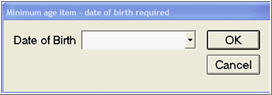
The birth date posts to the
transaction as an internal or external comment, depending upon the
setting in option 9419 "Post minimum age birth date as comment."
If the customer isn’t old
enough to purchase a type 1 and/or a type 2 item, then each time a
minimum age item is attempted to be posted the clerk will be given
the following response:
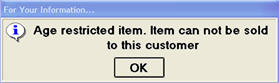
Optionally, depending on how
you set up option 9420 "Post underage comment when minimum age requirement
is not met," a comment indicating that the customer wasn’t old enough
to purchase will post/print on the transaction.
Below is an example of a transaction
in which the customer was old enough to buy cigarettes, but not old
enough to purchase alcohol. Note: When a minimum age item can’t be
sold, the only thing that posts (assuming option 9420 is set to do
so) is the comment "Minimum age not met – not sold." There
is no indication of what the item was that they attempted to buy.