


Use the following procedure to update the retail and/or cost of items on a range of orders, special orders, or quotes/estimates.
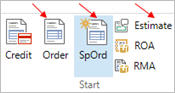
From the POS Header or Posting screen, click the Order, Special Order, or Estimate button.
click Menu, then click Batch Reprice.
Click 
 . A dialog box displays.
If you are repricing transactions for a particular customer, enter the Customer number (and Job, if any).
For a definition of each field, click here.
Click 
 to select specific repricing options. The Select Repricing Options dialog box displays. Fill in the fields as desired, and then click OK.
For a definition of each field, click here.
(Optional) To include or exclude certain items from being repriced, click 
 . The Select Line Items dialog box displays. Fill in the fields as desired, and then click OK.
For a definition of each field, click here.
(Optional) To enter a range of transaction numbers to reprice, click 
 . Fill in the From and To transaction numbers, and then click OK.
Click 
 . The system reprices the transactions.